Product

By
Mel Sheppard
//
31 January 2024

Learn what’s new in version 1.16 of Squirrel365. This latest release contains several bug fixes, improvements and new features. We are excited to see what people do with them.
We’ve created a new central location for project-specific settings. Previously, some of these existed on the main canvas properties although you could override them at publish time which confused many. We’ve simplified this now, and moved everything to a new location accessed via the FILE menu. Found under FILE > Project Settings. head here to change things like:
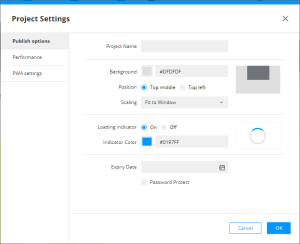
Anything set in Project Settings applies to your whole project and is saved as part of your SQRL file.
We’ve also added the option to automatically save a copy of your SQRL file when you publish a project to the cloud. You’ll find the option under the Performance section of Project Settings.
Donald MacCormick did a great job summarising the benefit of this feature on the Community site:
“Squirrel designers no longer have to keep track of which version of their SQRL files were used to publish which version of their cloud projects; the SQRL file can be automatically saved to the cloud when it is published, and so each version of the published project has its own SQRL file saved with it.”
With this option turned on you can access the download from the new download icon in either the Project Manager or the Version Manager.


Tidying up and consolidating project settings is useful but what about all new functionality for Squirrel365 in v1.16?
With 1.16 we’ve created a new suite of connectors for Smartsheets. Allowing you to read data from your sheets, as well as insert or update rows of data. Building apps on top of your Smartsheets has never been easier.
We have been able to connect to Google Sheets and Excel online documents for some time. Up until 1.16 you had to create a share link for your document, make it publicly accessible, and then use that in Squirrel. This worked well, however:
Now, that’s all changed! Squirrel 1.16 has direct connectivity to both Google Sheets and Excel online, with no need to create share links. Simply browse Google Drive, or One Drive to locate your document, and you’re away! Squirrel can then retrieve your spreadsheet data live and use it in your project.
Not only that but because we’re talking directly to the Google Sheet or Excel document, we can now update and insert rows too! Turn your project into an application with write-back capabilities, no database needed!
Progressive Web Applications, or PWAs, are web applications that have the ability to look and feel like native, stand-alone, desktop or mobile applications. There is loads of potential for what you can do with PWAs, but in 1.16 we’ve just implemented what we believe are the bare essentials:
*Obviously, if your application has live data connectivity, you will still need the internet.
Enabling and configuring PWA can be found in the “Project Settings” window.
We’ve been working on the direct Google / Excel connectivity and PWA framework for some time, and it’s great to see that it’s finally ready to be made available to the Squirrel community. I’m excited to see what people create with these new features.


GET STARTED
Sign up, get building, and pay when you’re ready to launch.